

Pace Note Rally – Free Browser Rally Game with Pacenotes
Play Pace Note Rally free in your browser: drive forest stages where the next bend is hidden, follow your co-driver's pacenotes, practice solo, share one screen, or race with an online co-driver.
Related Games






























A Browser Rally Game Where the Notes Lead
- Category
- Racing Games
- Platform
- Web browser on computer, tablet, or phone
- Mode
- Single-player practice or two-player co-op rally
- Developer
- Independent developer behind Pacenote Rally
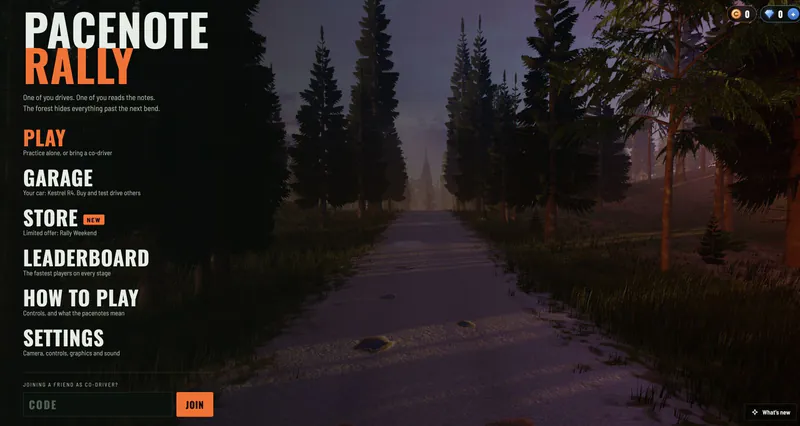
Pacenote Rally makes the co-driver the centre of rally driving. The stages are built so the next bend is hidden behind trees, hedges, fog, a crest, or darkness. You commit to the road from a voice, a number, and a direction rather than from what you can see. One player can drive against a robot co-driver, two players can share a screen with one reading the live map, or a co-driver can join online from another device with a room code.
The note system comes in two styles. Casual calls use seven plain speed words and modifiers such as gets tighter, opens up, and careful. Realistic calls follow the direction-grade-modifier-distance pattern that rally crews use. The pacenote book and co-driver map always keep the realistic notes, while the driver can choose which call style is spoken.
The garage currently contains 10 cars, from the free all-wheel-drive Kestrel R4 to rear-wheel-drive saloons, raid trucks, Group B-inspired machinery, and a mid-engined rally supercar. The first stages are free; others unlock with credits or gems. Each stage is a fixed road shared by everyone so stage times remain comparable. Across 16 stages, the scenery moves from spruce forest and farmland to fog, night, tarmac passes, high ridges, giant redwoods, and eight-jump gravel runs.
Classic and Realistic graphics offer different levels of visual detail without changing the drive. Touch players can turn a phone sideways and use the steering pad plus right-side pedals. Pacenote Rally is free, with credits earned from stages and optional gems in the store. Guest progress is local to the current browser; an account preserves cars, credits, and times across devices and enables worldwide leaderboard entries.
How to Play Pace Note Rally
Controls
Click Play Now above to open Pacenote Rally, then choose Play from the main menu. Practice puts you alone with a robot co-driver reading each corner. Same-screen mode lets a second player read the live map and call notes aloud while you drive. Online mode gives your co-driver a room code so they can call from another device, window, or tab.
The road disappears around the next bend on purpose: trust the call, turn when it says turn, and keep the car pointing down the stage. Press R if you leave the road and the car resets with a five-second penalty.
Start with casual notes. They use plain words such as hairpin, sharp, tight, medium, fast, easy, and slight, followed by a direction and modifiers such as gets tighter, opens up, long, careful, over a crest, or jump. Realistic notes add a numbered grade and the distance to the next call, matching the shorthand real rally crews use.
To hold a hairpin, pull the handbrake while the wheel is turned, keep steering into the slide, and use throttle to maintain it. Straightening the wheel lets the car grip again. F holds the high beams, Q and E look sideways, and the handbrake, throttle, and brake all work on a controller or the touch layout.
The first free car is the Kestrel R4. Finishing stages earns credits for more cars, paint, and liveries. Guest progress stays in the current browser, while an account keeps cars and times across devices and makes leaderboard runs count. Three free stages begin the route; the wider collection reaches 16 fixed stages and 10 cars. Finish cleanly, compare your split times, and learn the next corner before asking for more speed.
Game Features
- Practice solo or race with a same-screen or online co-driver
- Casual and realistic pacenote systems
- 16 fixed stages across forest, tarmac, fog, night, and mountain settings
- 10 cars with paint, liveries, wheels, lamps, and different drivetrains
- Keyboard, controller, and touch controls
- Free guest play with optional account-based progress and leaderboards
Pacenote Rally Gameplay Videos
Watch a co-op rally stage in this Wavedash browser-game showcase.
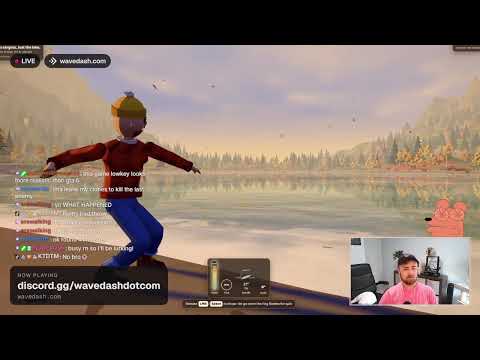
Wavedash live play: Pacenote Rally
Pacenote Rally Questions
How do Practice, same-screen, and online co-op work?
Practice gives one driver a robot co-driver. In same-screen mode, a second player reads the live road map and calls notes aloud while the first drives. Online mode gives the co-driver a room code and sends each call from another device, window, or tab to the driver's screen.
What is the difference between casual and realistic pacenotes?
Casual calls describe each bend with a plain sharpness word, direction, and optional modifier, then arrive when it is time to react. Realistic calls use direction, a numeric grade, modifier, and distance, closer to a real rally pacenote book.
How many stages and cars are available?
There are 16 stages and 10 cars. The routes include spruce gravel, farm lanes, fog, night tarmac, switchbacks, long forest stages, and high mountain passes. Cars progress from the free Kestrel R4 through rear-wheel-drive classics, raid trucks, Group B-inspired builds, and modern rally machinery.
Do I need an account to play?
You can start as a guest without signing up. Guest credits, cars, and times remain in the current browser, but clearing browser data or switching devices can lose them. An account preserves progress across devices and allows times to appear on the worldwide leaderboard.
What controls work on a keyboard, controller, or phone?
Keyboard drivers use W/S or the arrow keys for throttle and brake, A/D or left/right to steer, Space for handbrake, and R to recover. Controllers use the left stick, triggers, and face button. On touch screens, steering is on the left and gas, brake, and handbrake are on the right.
Who makes Pacenote Rally, and where can I play it?
Pacenote Rally is made by an independent developer, who uses the official About page for game questions and credits. It is free to play in Chrome, Safari, Edge, or Firefox on a computer, tablet, or phone. Open https://www.pacenoterally.com/ to start.