

Stunt Rider 3D – Play Online & Learn Bike Controls
Stunt Rider 3D is a browser motocross stunt game: manage speed over ramps and gaps, lean in the air to flip, and reach the finish to unlock the next track.
Related Games























Stunt Rider 3D Tracks, Stunts and Bike Progression
- Category
- Racing Games
- Platform
- Web browser with keyboard controls
- Mode
- Motocross obstacle racing and motorcycle stunts
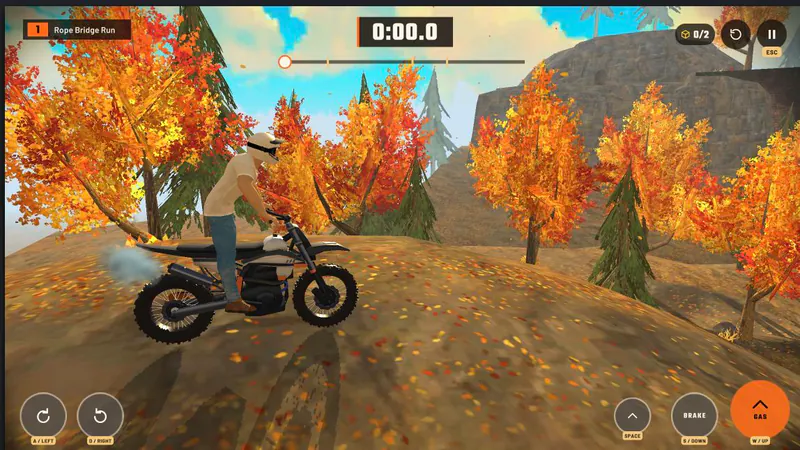
Stunt Rider 3D is a motocross racing game built around obstacle-filled courses. Ramps, gaps, slopes and hazards make each run a balance between carrying enough speed and keeping the motorcycle under control. Reaching the finish completes a level; crashing ends the current run.
The main stunt input is the bike’s lean while airborne. Tip forward or backward to rotate through flips, then correct the bike’s angle for the landing. A clean approach matters because too little speed can leave a gap uncleared, while speed without a landing adjustment can send the rider into a crash.
Finishing a level unlocks the next course. Performance rewards can be used to improve bike speed or power, and additional motorcycles are available as you progress. Courses span multiple settings, including mountain and factory environments, and the core loop stays the same: ride, balance, land and reach the finish.
How to Play Stunt Rider 3D
Controls
After the game loads above, use its on-screen start control to enter a motocross course. Keep your hands on WASD or the arrow keys, and look ahead for the next ramp, gap or hazard.
Build enough speed to cross each gap, but ease off when a ramp or landing needs more control. While airborne, lean forward or backward to rotate the motorcycle through a flip. Bring the bike back into line before touching down; a crash ends the current run.
Press Space or R to restart from the latest checkpoint. Reach the finish to complete a level and unlock the next. Performance rewards can also improve speed or power, giving you a reason to revisit a course with a stronger setup.
Game Features
- Motocross courses with ramps, gaps, slopes and hazards
- Keyboard controls for acceleration, braking and bike lean
- Lean forward or backward in the air to flip
- Press Space or R to restart from the latest checkpoint
- Finish levels to unlock the next course
- Use performance rewards to upgrade speed or power
Stunt Rider 3D Controls & Course FAQ
Where can I play Stunt Rider 3D online?
Click Play Now above to load Stunt Rider 3D in the player. Use the game’s on-screen start control to enter a course, then ride with the keyboard.
How do I steer and manage speed?
Use W or Up to accelerate and S or Down to brake or reverse. A/Left leans backward, while D/Right leans forward.
How do I perform flips on the stunt bike?
Use the forward and backward lean inputs while the bike is airborne to rotate through a flip, then straighten the motorcycle before landing.
What happens when the motorcycle crashes?
A crash ends the current run. Press Space or R to restart from the latest checkpoint.
How do I unlock another level?
Reach the finish to complete the current level and unlock the next one. Performance rewards can also improve bike speed or power.